Showing posts with label Announcements. Show all posts

Thursday, 28 January 2016

Announcing GA Support for Accelerated Mobile Pages (AMP) Analytics

When Google was a few years old, we wrote up a list of Ten things we know to be true. The list includes items like “Focus on the user and all else will follow” as well as “Fast is better than slow.” It would be tough to say that much of the mobile web has adhered to these principles. Users often get frustrated by poor experiences in which sites load slowly or will lock up trying to load resources that clog their data connections.

The Accelerated Mobile Pages Project (AMP) is an open source initiative that aims to address these problems by enabling content to load instantaneously and provide a better web experience for all. AMP introduces a new format that is a flavor of HTML. It’s built to prioritize speed and a fantastic user experience. One way that AMP provides reliably good page loading performance is by restricting the ability to add custom JavaScript to pages and instead relying on built in, reusable components.

Today, the AMP team announced the launch of an analytics component that will enable measurement on AMP pages. The Google Analytics team is committed to helping our users measure their content wherever it appears. So, for publishers looking to use AMP to provide an improved user experience, we’ve released Google Analytics measurement capabilities for Accelerated Mobile Pages. AMP support in Google Analytics makes it easy to identify your best content and optimize your user experience.

How Google Analytics Support Works

Analytics on AMP is handled by an open source, reusable component that the Google Analytics team helped build. The <amp-analytics> component can be configured with Google Analytics specific configuration parameters to record pageviews, events, and even custom dimensions. That configuration works hand in hand with a global event listener that automatically detects triggers like button presses. As a result, there’s no need to scatter custom JavaScript throughout your page to detect actions that should trigger events and hits. Instead, you can define which actions should trigger hits within the configuration section and let the magic of AMP do the rest.

How to Get Started

Before you get started with AMP Analytics, you’ll need to get started with AMP itself. The AMP website contains a great introduction to getting started. Once you have an AMP page up, it’s time to start thinking about how you’d like to measure its performance. 

We recommend that you use a separate Google Analytics property to measure your AMP pages. AMP is a new technology that’s going to mature over time. As such, some of the functionality that you’re used to in web analytics won’t immediately be available in AMP analytics right away. AMP pages can appear in multiple contexts, including through different syndication caches. Because of that, a single user that visits an AMP version of a page and a HTML version of a page can end up being treated as two distinct users. Using a separate Google Analytics property to measure AMP pages makes it easier to handle these issues.

Once you have your AMP page and new Google Analytics property set up, you’ll want to reference the requirements for using Analytics on AMP pages as well as the developers guide for instrumenting measurement.

What’s Next

Multiple technology partners, including Google Search, Twitter, Pinterest, and LinkedIn have announced that they’ll start surfacing AMP pages in the coming months. The Google Analytics team is excited to support AMP from day one and look forward to growing our offering as AMP’s capabilities expand.


Posted by Dan Cary, Product Manager and Avi Mehta, Software Engineer

Thursday, 10 December 2015

Use Smart Goals, powered by Google Analytics, to optimize in AdWords

To advertise smart, you have to measure smart.  And a key metric for almost any business is conversions, also known as “that moment when users do the thing that you want them to do.”  

Many AdWords advertisers are already measuring their website conversions, using either AdWords Conversion Tracking or imported Google Analytics Ecommerce transactions.  Measuring actual conversions is ideal, because it allows you to optimize your bids, your ads and your website with a clear goal in mind.

However, hundreds of thousands of small and medium businesses aren't measuring their website conversions today.  Some businesses may not have a way for users to convert on their website and others may not have the time or the technical ability to implement conversion tracking.

The Google Analytics team is committed to helping our users use their data to drive better marketing and advertising performance.  So, for businesses that don’t measure conversions in AdWords today, we’ve created an easy-to-use solution: Smart Goals. Smart Goals help you identify the highest-quality visits to your website and optimize for those visits in AdWords. 

"Smart Goals helped us drive more engaged visits to our website. It gave us something meaningful to optimize for in AdWords, without having to change any tags on our site. We could tell that optimizing to Smart Goals was working, because we had higher sales than usual across our channels during the testing period."

- Richard Bissell, President/Owner, Richard Bissell Fine Woodworking, Inc

How Smart Goals Work

To generate Smart Goals, we apply machine learning across thousands of websites that use Google Analytics and have opted in to share anonymized conversion data.  From this information, we can distill dozens of key factors that correlate with likelihood to convert: things like session duration, pages per session, location, device and browser.  We can then apply these key factors to any website.  The easiest way to think about Smart Goals is that they reflect your website visits that our model indicates are most likely to lead to conversions. 

Step 1: Activate Smart Goals in Google Analytics

To activate Smart Goals in Google Analytics, simply go to the Admin section of your Google Analytics account, click Goals (under the View heading) and select Smart Goals.  The highest-quality visits to your website will now be turned into Smart Goals automatically.  No additional tagging or customization is required; Smart Goals just work.  

To help you see how Smart Goals perform before you activate them, we’ve built a Smart Goals report in the “Conversions” section of Google Analytics.  The behavior metrics in this report indicate the engagement level of Smart Goals visits compared to other visits, helping you evaluate Smart Goals before you activate the feature.

Click image for full-sized version


Step 2: Import Smart Goals into AdWords

Like any other goal in Google Analytics, Smart Goals can be imported into AdWords to be used as an AdWords conversion.  Once you’ve defined a conversion in AdWords, you’re able to optimize for it.

Click image for full-sized version

Step 3: Optimizing for Smart Goals in AdWords

One of the benefits of measuring conversions in your Adwords account is the ability to set a target cost per acquisition (CPA) as opposed to just setting a cost per click (CPC).  If you aren’t measuring actual conversions today, importing Smart Goals as conversions in Adwords allows you to set a target CPA.  In this way, you’re able to optimize your Adwords spend based on the likelihood of conversion as determined by our model.

Smart Goals will be rolling out over the next few weeks. To be eligible for Smart Goals, your Google Analytics property must be linked to your AdWords account(s).  Learn how to link your Google Analytics property to your AdWords account(s) in the Analytics Help Center or the AdWords Help Center.  Note that your Google Analytics view must receive at least 1,000 clicks from AdWords over a 30-day period to ensure the validity of your data.

Posted by Abishek Sethi (Software Engineer) and Joan Arensman (Product Manager)

Thursday, 12 November 2015

Share Google Analytics data and remarketing lists more efficiently using manager accounts (MCC)

The following was originally posted on the AdWords Blog.

From monitoring account performance at scale to making cross-account campaign changes, manager accountshelp many of the most sophisticated AdWords advertisers get more done in less time. To deliver more insightful reporting and scale your remarketing efforts, we’re introducing two new enhancements to manager accounts: Google Analytics account linking, and remarketing tag and list sharing.

Access your data with a single link

You can now link your Google Analytics or Google Analytics Premium account directly to your AdWords manager account using the new setup wizard in AdWords under Account Settings. This streamlined workflow for linking accounts eliminates the need to link each of your Google Analytics and AdWords accounts individually.

Click image for full-size version

Now when you import your goals, website metrics, remarketing lists, or other data from Google Analytics, you'll only need to do it once. And whenever you add a new AdWords account to your manager account, it will automatically be linked with the same Analytics properties.

These enhancements save time so you can focus on optimizing your campaigns. You can learn more about linking your Google Analytics account into your manager account in the AdWords Help Center.

Scale your remarketing strategy

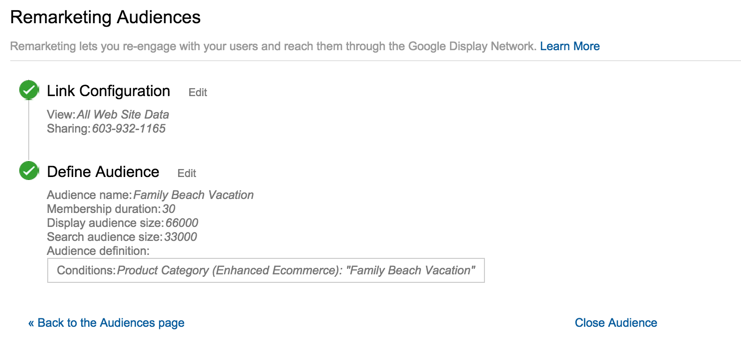
Many advertisers are seeing tremendous success re-engaging customers and finding new ones using Display remarketing, remarketing lists for search ads, and similar audiences. To help scale these efforts across the AdWords accounts you manage, you now have options for creating and sharing remarketing lists directly in your manager account from the new “Audiences” view, including any lists imported from Google Analytics or Customer Match.

You can also create remarketing lists using a manager-level remarketing tag and use them across your managed accounts. This eliminates the need to retag your website and manage multiple lists in each AdWords account. If any of your managed accounts have their own lists, they can be made available for use in your other managed accounts.

These enhancements make it easier and faster than ever before to get your remarketing strategy up and running. You can learn more about sharing remarketing tags and lists in the AdWords Help Center.


Posted by Vishal Goenka, Senior Product Manager, AdWords

Happy 10th Birthday, Google Analytics!

Today marks the 10th anniversary of the launch of Google Analytics. So much has changed over the last decade! If you think back ten years ago, the most popular smartphone was the Blackberry and a 128 megabyte flash drive cost about $30. Today you can get 250X the storage for half the price.

During that time, the world we now refer to as “digital analytics” has changed significantly. 

Our mission when Google acquired Urchin Software was to empower a broad range of website developers and marketers to better understand and improve their business through powerful, yet easy to use analytics tools. In pursuit of that goal we've continued to bring new digital analytics capabilities to the market with Google Analytics Premium, Google Tag Manager,  and Adometry. I’m really proud of the effort and innovation we have put forth in pursuit of that goal.

Looking back on the journey, here are my top ten Google Analytics highlights in no particular order:
  1. Event Tracking - A powerful feature added early on that allows users to track visitor actions that don't correspond directly to a pageview. With event tracking, specific actions like PDF downloads and video views are easily tracked, categorized, and analyzed. This feature has become critical as websites have moved away from a page-structured model. Read how PUMA uses custom filters, event tracking, and advanced segments to kick up order rates by 7%.
  2. Real-Time Reporting - Providing insights into what is happening at any given moment, real-time reporting is a powerful set of reports that are invaluable when checking campaign tagging, launching new campaigns, or understanding the immediate impact of social media. Read how Obama for America used Google Analytics to democratize rapid, data-driven decision making.
  3. Multi-Channel Funnels, Attribution Modeling, and Data-Driven Attribution - Multi-channel funnels was the first step in helping marketers move from last-click attribution and gain insights into the full path to conversion. Next up was Attribution Modeling, which helps businesses distribute credit to all marketing touch-points in the conversion process. We currently provide algorithmic models and a new set of reports designed to take the guesswork out of attribution and make it more accurate. Watch how attribution modeling increases profit for Baby Supermall.
  4. Tag Management - As the complexity of digital marketing and data collection continues to increase, it became clear that our users needed better tools for managing tags. Google Tag Manager consolidates website tags with a single snippet of code and lets users manage everything from an easy to use interface. Read how Domino’s Increased Monthly Revenue by 6% with Google Analytics Premium and Google Tag Manager.
  5. Analytics Academy - A great product is only as good as its users ability to take advantage of all it offers. As the world of marketing and analytics increased in complexity, it became more important for Google Analytics users to be able to stay up to speed on all the changes. In response to this need, the Analytics Academy offers users a hub to participate in free, online, community-based video courses about digital analytics and, specifically, Google Analytics.
  6. Universal Analytics - Universal Analytics (UA) was a big step for Google Analytics on two dimensions. First, UA helps address the challenges of today’s multi-screen, multi-device world by combining visitor activities across devices into a single view. Secondly, it is the foundation of people-centric analytics and enables features like User ID, Lifetime-Value, and Cohorts reporting. Read how 1stdibs luxury marketplace hit new heights with Google Analytics Premium.
  7. Measurement Protocol - This feature was one of the foundations for Universal Analytics. It helped Google Analytics change from a  “web analytics” tool to “digital analytics” platform. The measurement protocol allows users to send, store, and visualize interaction data via an HTTP request. This enables developers to measure how users interact with their business from almost any environment including offline transactions and IoT (Internet of Things) devices. Read how AccuWeather unlocks cross-channel impact using Google Analytics Premium.
  8. Mobile App Analytics - With the explosion of mobile apps and devices, being able to measure and improve both app marketing performance and the app experience is critical. Mobile App Analytics reports are tailored for mobile app developers and marketers to measure the entire mobile customer journey—from discovery to download to engagement. And, when used with the UserID feature, businesses can better understand cross device user behavior. Read how Certain Affinity used Google’s Mobile App Analytics to improve game design.
  9. Enhanced Ecommerce - A complete revamp of how Google Analytics measures the ecommerce experience. It   provides clear insight into new, important metrics about shopper behavior and conversions including: product detail views, ‘add to cart’ actions, internal campaign clicks, the success of internal merchandising tools, the checkout process, and purchase. Read how Brian Gavin Diamonds saw a 60% Increase in customer checkouts with enhanced ecommerce.
  10. Remarketing - Remarketing with Google Analytics helps you easily create audiences based on behaviors of people who visit your website and mobile app. Those audiences are then made available for remarketing campaigns in AdWords, GDN and DoubleClick Bid Manager. Read how TransUnion sees drastic cost efficiencies and conversion improvement with Google Analytics Premium.
I want to thank all the Googler’s, our certified partners, and most importantly, our users who have made this past decade such a fantastic experience. Rest assured, we’re not done yet. We continue to enhance Google Analytics, build new products, and  provide new and innovative ways to help all businesses make better decisions. Stay tuned and cheers to the possibilities of the next decade.


Posted by Paul Muret, VP Engineering

Thursday, 27 August 2015

Real-Time Data Validation with Google Tag Assistant Recordings

We’ve said it before and we’ll say it again: great analytics can only happen with great data.  

That's why we've made it a priority to help our users confirm that their data is top-quality. Last year we released our automated data diagnostics feature, and now we’re proud to announce the launch of another powerful new feature: Google Tag Assistant Recordings.  

This tool helps you instantly validate your Google Analytics or Google Analytics Premium implementation. If it finds data quality issues, it helps you troubleshoot them and then recheck them on the spot.  It’s available as part of the Google Tag Assistant Chrome Extension.
Screen Shot 2015-07-21 at 2.27.31 PM.png
"Tag Assistant Recordings is fast becoming one of my favorite tools for debugging Google Analytics Premium installations!  I use it multiple times a day with my Premium clients to help explain odd trends in their data or debug configuration issues. Already I'm building it into my core workflow." 

- Dan Rowe, Director of Analytics at Analytics Pros

What can I use it for?

Tag Assistant Recordings works with all kinds of data events: purchases, logins, and so on. What if you sell flowers online and want to confirm that Enhanced Ecommerce is capturing the checkout flow correctly? With Tag Assistant Recordings, you can record yourself going through the checkout process as you buy a dozen red roses, and then review what Google Analytics captured.

If you find that your account isn’t set up properly — if the sale wasn't recorded or was mis-labeled — you can make adjustments and test it all over again instantly.  With Tag Assistant Recordings, you know you’re capturing all the data that’s important to you.

Tag Assistant Recordings can be particularly useful when (1) you’re in the process of implementing Google Analytics or Google Analytics Premium, (2) you’ve recently made updates to your site, or (3) you’re making changes to your Google Analytics or Google Analytics Premium configuration. It works even if your new site or your updates aren't visible to the public yet, so you can feel confident before you go live.

Tag Assistant Recordings can also help if you want to reconfigure your Google Analytics account to better reflect your business.  For example, you may want to configure multi-channel funnels to detect your AdWords channel.  Tag Assistant Recordings lets you set up this new functionality in Google Analytics and test immediately whether everything is working as you expect.  

"Tag Assistant Recordings has already been a HUGE help! Analytics Pros and About.com were working on an issue with sessions double-counting and Tag Assistant Recordings let us narrow down precisely which hits were having new sessions counted. It saved us hours of time and helped us jump right to where the problem was. So, in summary, this is awesome!"  

- Greg McDonald, Business Intelligence Analyst at About.com

How does it work?

Tag Assistant Recordings works through the Google Tag Assistant Chrome Extension, so you’ll need to download the extension if you aren’t already using it.  From there, setup is easy.  Simply open Google Tag Assistant, record the user flow you’d like to check, and then view the full report in Tag Assistant.  You’ll want to view both tabs in the report (Tag Assistant and Google Analytics) to verify that you see the intended tags.  Keep in mind that the Google Analytics data is only available if you have access to the appropriate property or view.

Tag Recordings Gif.gif

Here's a nifty bonus: If you find a problem, and you think you have fixed it by changing settings from within Google Analytics, return to the Google Analytics tab in Tag Assistant Recordings and click the “Update” button. You'll see instantly how your configuration changes would have affected this recording.

We hope that Google Tag Assistant will be a valuable new tool in your analytics toolkit.  

Why not start using it today?


Posted by:  Ajay Nainani, Frank Kieviet, and Jocelyn Whittenburg, Google Analytics team

Wednesday, 19 August 2015

Google Analytics User Conference: G’day Australia

The Australian Google Analytics User Conference is worth clearing your diaries for, with some of the most well-known and respected international industry influencers making their way to Sydney and Melbourne to present at the conference this September.

Hosted by Google Certified Partners, Loves Data, you’ll be learning about the latest features, what’s trending and popular, best practices and uncovering ways to get the most out of Google Analytics. Topics covered include: making sure digital analytics is indispensable to your organisation; applying analytics frameworks to your whole organisation; improving your data quality and collection; data insights you can action; and presenting data to get results.

Presenting the keynote is Jim Sterne, Chairman of the Digital Analytics Association, founder of eMetrics and also known as the godfather of analytics. Joining him are two speakers from Google in the US: Krista Seiden, Google Product Manager and Analytics Advocate and Mike Kwong, Senior Staff Software Engineer.

Other leading international industry influencers presenting at the conference include Simo Ahava (Google Developer Expert; Reaktor), Chris Chapo (Enjoy), Benjamin Mangold (Loves Data), Lea Pica (Consultant, Leapica.com), Chris Samila (Optimizely), Carey Wilkins (Evolytics) and Tim Wilson (Web Analytics Demystified).  

Expect to network with other like-minded data enthusiasts, marketers, developers and strategists, plus get to know the speakers better during the Conference’s Ask Me Anything session. We’ve even covered our bases for those seeking next-level expertise with a marketing or technical masterclass available the day before the conference. Find out more information about the speakers and check out the full program.

Last year’s conference sold out way in advance and this year’s conference is heading in the same direction. Book your tickets now to avoid disappointment. 

Event details Sydney
Masterclass & Conference | 8 & 9 September 2015

Event details Melbourne
Masterclass & Conference | 10 & 11 September 2015

Posted by Will Pryor, Google Analytics team

Thursday, 25 June 2015

Remarketing Lists for Search Ads, Powered by Google Analytics

Today we’re excited to announce you can use audiences (previously remarketing lists) created in Google Analytics to reach your customers on Google Search, with no tagging changes required. 

Remarketing Lists for Search Ads (RLSA) allows you to tailor your search ads and based on your visitors' past activity on your website. Now you can leverage more than 200 Google Analytics dimensions and metrics to create and activate your audiences for remarketing, then use those audiences to reach and re-engage your customers with a consistent message across both Google Search and Display.

TransUnion cuts CPA in half with RLSA

In order to find more customers while reducing waste in their search campaigns, TransUnion, a leading financial services provider, used the audience creation capabilities in Google Analytics to spend more efficiently on Google Search.

TransUnion started by creating two audiences. The first was for new customers―those who had visited the site and started, but not completed a credit application. The other included customers who had already converted. Splitting the audience between new and existing customers allowed TransUnion to bid higher on Google search ads for new customers and spend less on converted customers.

The new RLSA capabilities in Google Analytics yielded impressive conversion rates and cost efficiencies for TransUnion's search campaigns. RLSA visitors had a lower bounce rate and viewed twice as many pages per session compared with regular visitors. 

By using more tailored text with their remarketing lists, TransUnion increased their conversion rate by 65% and average transaction value by 58%. Meanwhile, CPCs for existing customers dropped 50%, resulting in a roughly 50% drop in their cost per transaction. Read the full case study here

How to get started

Getting started with RLSA is easier than ever before thanks to Instant Activation. Within the Admin tab, simply click Property, then Tracking Info, and finally Data Collection. Ensure that Remarketing is set to ‘ON.’


Once you’ve enabled this setting, all your eligible audiences will begin to populate for RLSA.

Building Audiences

If you’d like to create new audiences, there are three ways to get started. 

First, you can create a new audience using the Audience builder in the remarketing section of the Admin tab. Make sure you select the relevant AdWords account to share your audience with for remarketing.


If you have an existing segment you’d like to turn into an audience, simply click on the segment options and select “Build Audience” right from within reporting. This option will take you directly to the audience builder as above.  


Finally, you can get started quickly and easily by importing audiences from the Google Analytics Solutions Gallery.

Activating audiences in AdWords

Once you have shared an audience with AdWords, it will appear instantly in your AdWords Shared Library and will show eligible users in the column List size (Google search).  Keep in mind that an audience must accumulate a minimum of 1,000 users before you can use it for remarketing on Google Search. To get started, follow the instructions in the AdWords Help Center

Support for RLSA with Google Analytics is part of an ongoing investment to provide powerful ways to activate your customer insights in Google Analytics, along with recent features like Cohort Analysis, Lifetime Value Analysis, and Active User Reporting. Stay tuned for more announcements!

Happy Analyzing,
Lan Huang, Technical Lead, Google Analytics,
Xiaorui Gan, Technical Lead, Google Search Ads

Wednesday, 24 June 2015

Learn to optimize your tag implementation with Google Tag Manager Fundamentals

We're excited to announce that our next Analytics Academy course, Google Tag Manager Fundamentals, is now open for participation. Whether you’re a marketer, analyst, or developer, this course will teach you how Google Tag Manager can simplify the tag implementation and management process.

You'll join instructor Krista Seiden to explore topics through the lens of a fictional online retailer, The Great Outdoors and their Travel Adventures website. Using practical examples, she’ll show you how to use tools like Google Analytics and Google AdWords tags to improve your data collection process and advertising strategies.


By participating in the course, you’ll explore:
  • the core concepts and principles of tag management using Google Tag Manager
  • how to create website tags and manage firing triggers
  • how to enhance your Google Analytics implementation
  • the importance of using the Data Layer to collect valuable data for analysis
  • how to configure other marketing tags, like AdWords Conversion Tracking and Dynamic Remarketing
We're looking forward to your participation in this course!

Sign up for Google Tag Manager Fundamentals and start learning today.

Happy tagging!

Post By: Lizzie Pace & The Google Analytics Education Team

Thursday, 28 May 2015

New media partnerships and ad solutions for mobile app promotion

As complexity increases in the app ecosystem, successful developers are looking for new ways to measure, manage, and optimize across multiple ad networks and operating systems.  This morning, at our annual I/O conference, we announced via Livestream a new set of media partnerships and ads offerings designed to meet the unique needs of mobile app marketers.  

Transparent, open and reliable measurement solutions

For app developers looking to drive installs and engagement, it’s critical to understand the effectiveness of various media partners and placements. That’s why we have been investing in solutions to help developers apply consistent measures across a fragmented ecosystem of ad networks, and understand the quality of users that each delivers.  

Google Analytics for Apps provides an industry-leading solution for in-app analytics that is increasingly benefiting advertisers as they seek more transparency into ad effectiveness across networks.  You can already use Google Analytics to track the performance of your mobile app install campaigns and understand the lifetime value of your users on both Android and iOS. As of today, we’ve built partnerships with 20+ ad networks including InMobi and Millennial Media since launching iOS conversion tracking late last year. Data integration with these partners provides a comprehensive view of app value across networks based on the metrics developers care about (i.e., LTV and retention), helping you make better decisions on where to spend your advertising dollars. In the next few months, you’ll be able to “postback” your conversions to referring networks in order to optimize your traffic -- all made possible with a single SDK. 

And it's not just about our measurement solutions.  We recognize that developers should have choices when it comes to attribution vendors, and are committed to open solutions for the industry.  That’s why we also announced the ability to integrate app install and event data from key third party measurement partners into AdWords. Working with third parties, including Adjust, Appsflyer, Apsalar, Kochava, and Tune, we are able to increase measurement accuracy between different trackers in AdWords, ensuring your data is accurate and  reliable.

By partnering with these leading ad platforms and tracking systems, we believe we can make the entire mobile apps ecosystem stronger and more connected -- all with the goal of making developers more successful.

But we didn’t stop there. 

It’s easier than ever to promote your apps across Google 

For developers looking to promote their app, we offer a variety of placements across Google Search, the AdMob network, mobile sites, and YouTube.  And earlier this year, we announced Search Ads on Google Play. By showing ads alongside app search results, you can reach consumers right when they’re looking for a new app, at the moment they are ready to install
Click for full-sized image

Today we announced Universal App Campaigns, a new campaign type that allows advertisers to reach consumers across Google media more efficiently and effectively.  Universal App Campaigns offers a simple way to set up install ads for your Android apps in AdWords or directly from the Google Play Developer Console

Click for full-sized image

With a single campaign, you can scale your reach across Google Search, the AdMob network, mobile sites, YouTube and Google Play. Just provide us with a few inputs about your app what your ad creative will say, the audience you wish to reach, and how much you want to spend we’ll do the rest for you. Behind the scenes, our ad creation and bidding engines will help maximize performance for your campaigns so you can spend more time building and enhancing your apps.  Search Ads on Google Play and Universal App Campaigns will be rolled out to developers and advertisers in the coming months.

Complete solutions for your entire business

Today at I/O we also announced solutions to help you develop apps, engage users organically, and earn more money from your app.  Our innovations in analytics and ads are designed to complement these offerings, and allow you to grow your business with measurement solutions that are open and reliable, and promotion tools that make ad buying easier and more effective.  Thank you to all the developers out there who are building these experiences. We look forward to engaging with your apps and supporting your ongoing innovation by working closely with you and your partners in the ecosystem.

Posted by: Jonathan Alferness, Vice President, Product Management

Thursday, 30 April 2015

Introducing Search Response and Airings Data in TV Attribution

The following is a cross post from Adometry by Google, a Marketing Analytics and Attribution product

Mass media drives people to interact with brands in compelling ways. When a TV or radio ad creates an I-want-to-know, I-want-to-go, or an I-want-to-buy moment in the mind of a consumer, many pursue it online. Immediately - and on whatever screen they have handy.

Last year, we announced Adometry TV Attribution, which measures the digital impact of offline channels such as television and radio. Now, we’re moving TV Attribution forward by integrating Google Search query data and Rentrak airings data to help marketers better understand the important moments their broadcast investments create.

New Search Behavior, New Search Analysis
Broadcast media doesn’t just drive consumers directly to websites — it drives searches. Now, TV attribution lets you analyze minute-by-minute aggregated Google Search query data against spot-related keywords to detect and attribute search “micro-conversions” to specific TV airings. 

With insights on the entire digital customer journey — including search behaviors — brands can better evaluate broadcast network and daypart, specific ad creative, and keyword performance. As a result, brands can:
  • Assess Immediate Influence: See which messages are sticking in the minds of consumers to both maximize TV interest and choose ideal keywords for SEO and paid search strategies.
  • Evaluate Awareness Goals: Optimize against a digital signal even when a site visit isn’t the primary goal, such as in brand awareness or sponsorship campaigns.
  • Analyze Competitive Category: Glean which generic keywords drive category interest for the industry — a type of insights not possible through site traffic analysis alone. 

Rentrak Partnership Speeds TV Attribution Insights
Knowing when your spots aired and collecting that data for timely TV attribution analysis can be a challenge. Marketers who buy broadcast media through agencies often don’t have direct access to this data. And once data is obtained — after coordinating with multiple agencies, partners, and TV measurement companies — the time lag makes for outdated analysis. 

TV Attribution now solves these challenges a new partnership with Rentrak, the leading and trusted source for TV airings information. 

What Rentrak Integration Delivers
Integrating directly with Rentrak TV Essentials, TV Attribution now overcomes some of the biggest hurdles in TV measurement, with increases in: 
  • Actionability: TV Attribution can more quickly and easily obtain TV data for analysis without time-consuming coordination from you or your agencies.  
  • Accuracy: Rentrak provides a comprehensive data set with aggregated viewership information from more than 30 million televisions across the country, and from more than 230 networks.
  • Frequency: A direct relationship means more frequent reporting since there is no longer a manual find-and-transfer of data required from TV buying partners.
“What makes this partnership so exciting is it removes the biggest barrier to truly measuring TV effectiveness, timely access to spot airings data including impressions,” said Tony Pecora, CMO for SelectQuote. “Rather than hunting and gathering data, we are now able to spend our time evaluating insights and optimizing our marketing investments across both TV and digital. As a CMO, this is a really big win for our business.”

Want to Get Moving?

The gap between offline and digital measurement continues to close. Learn more about how Adometry TV Attribution, now with Google Search query data and integrated Rentrak airings data, can help you gain more actionable cross-channel insights.

Posted by Dave Barney, Product Manager

Tuesday, 31 March 2015

Google Analytics Introduces Product Release Notes

Ever feel like you just can’t keep up with all the new features in Google Analytics? We hear you! To help you keep track of everything that’s going on, we’ve started publishing Release Notes in our product Help Center.

Release notes will be updated periodically and will have the most comprehensive list of new features or changes to the Google Analytics product. So, if you see something new in your account and have questions, we recommend starting here. We’ll point you to the relevant documentation to get you up to speed on everything you need to know.

We're happy to be adding another resources to keep our users informed. Check it out today!

Posted by Louis Gray, Analytics Advocate

Thursday, 26 February 2015

Safe Browsing and Google Analytics: Keeping More Users Safe, Together

The following was originally posted on the Google Online Security Blog.

If you run a web site, you may already be familiar with Google Webmaster Tools and how it lets you know if Safe Browsing finds something problematic on your site. For example, we’ll notify you if your site is delivering malware, which is usually a sign that it’s been hacked. We’re extending our Safe Browsing protections to automatically display notifications to all Google Analytics users via familiar Google Analytics Notifications.


Google Safe Browsing has been protecting people across the Internet for over eight years and we're always looking for ways to extend that protection even further. Notifications like these help webmasters like you act quickly to respond to any issues. Fast response helps keep your site—and your visitors—safe.

Posted by: Stephan Somogyi, Product Manager, Security and Privacy